If you’re looking to enhance your soundbar experience, consider the top optical to analog volume control devices that convert digital signals into high-fidelity sound.
Options like the BlueRigger 3×1 Switch and PROZOR converters offer convenience and built-in volume control, making them ideal for soundbar setups.
The eSynic Portable Adapter and AUTOUTLET DAC ensure quality sound without the hassle of complicated installations.
With thoughtful design and compatibility, these devices make setup easy while enhancing audio clarity for your soundbar.
Keep exploring to discover which one fits your audio needs best!
BlueRigger Digital Toslink Optical 3×1 Switch

If you’re looking for a reliable way to connect multiple optical audio devices to a single output, the BlueRigger Digital Toslink Optical 3×1 Switch is an excellent choice for soundbar enthusiasts. This switch lets you connect three Toslink devices, such as soundbars or gaming consoles, to one output seamlessly. It supports LPCM 2.0 and DTS 5.1, ensuring high-quality audio at 192kHz/24Bit, ideal for enhancing your soundbar experience. The included IR remote makes switching devices easy, though keep in mind it doesn’t support auto-switching. With a durable metal housing and two-year warranty, you can trust its performance for all your audio needs. Just remember, Toslink cables should be under 50FT for optimal performance!
Best For: Soundbar users seeking a versatile solution to connect multiple optical audio devices to a single output with high-quality sound.
Pros:
- Supports high-quality audio formats such as LPCM 2.0 and DTS 5.1, providing an immersive audio experience for soundbars.
- Durable metal housing ensures longevity and effective heat dissipation, perfect for consistent use with your sound system.
- Includes an IR remote for convenient manual switching between devices, making it easy to manage your soundbar setup.
Cons:
- Does not support auto-switching, requiring manual selection of devices, which may be less convenient for some users.
- Power adapter not included, which may necessitate an additional purchase to ensure proper functionality.
- Toslink cables must be shorter than 50FT, potentially limiting setup options in larger spaces.
eSynic Portable Optical to RCA Adapter 7 FT Long DAC Converter

The eSynic Portable Optical to RCA Adapter is an excellent choice for anyone looking to enhance their audio experience with soundbars, especially when connecting devices like HDTVs, Blu-ray players, or gaming consoles. With a 7 FT cable and a 192kHz DAC converter, it’s designed for easy plug-and-play setup. The 24-bit DAC chip provides crystal-clear sound, considerably improving audio quality over standard TV speakers. Its durable aluminum housing and gold-plated RCA ports guarantee longevity. While it requires a 5V power source via USB, users appreciate the straightforward installation and the impressive sound quality this adapter delivers when used with their sound systems.
Best For: The eSynic Portable Optical to RCA Adapter is best for users seeking to connect their HDTVs, Blu-ray players, or gaming consoles to a soundbar for enhanced audio quality.
Pros:
- Excellent sound quality with 192kHz DAC converter and 24-bit resolution, perfect for soundbars.
- Easy plug-and-play setup with no drivers or external power needed from the optical port.
- Durable design with aluminum housing and gold-plated RCA ports for long-lasting use.
Cons:
- Requires a separate 5V power source via USB, which is not included.
- Initial setup may involve adjustments in TV settings that could be confusing for some users.
- Some users may need to purchase additional adapters for specific soundbar setups.
PROZOR Digital to Analog Audio Converter with Optical Cable
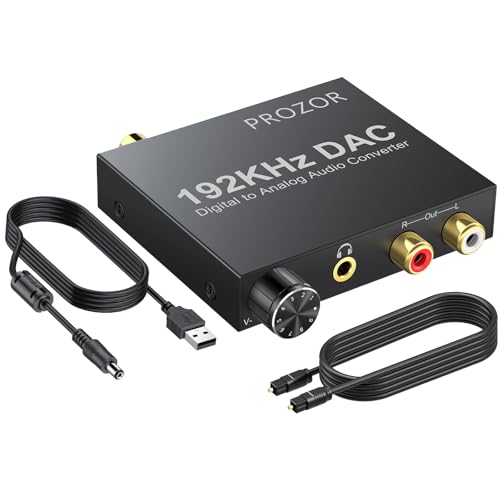
For sound enthusiasts looking to connect digital audio sources to their soundbars, the PROZOR Digital to Analog Audio Converter with Optical Cable is a fantastic option. This device converts coaxial or Toslink digital PCM audio signals into analog L/R RCA and a 3.5mm jack audio output simultaneously. With support for a 192kHz 24-bit sampling rate, it provides various options from 32kHz to 192kHz, ensuring exceptional sound quality for your listening experience. The built-in volume control knob makes it easy to adjust output levels to suit your preferences. The durable aluminum casing and gold-plated connectors help minimize signal loss, enhancing overall performance. Simply connect it to a compatible 5V power supply, and you’re all set to enjoy superior audio through your soundbar.
Best For: Sound enthusiasts looking to convert digital audio signals to high-quality analog outputs for an optimal soundbar experience.
Pros:
- Supports multiple sampling rates up to 192kHz, offering flexibility for different audio formats.
- Built-in volume control knob allows for convenient adjustment of output levels.
- Durable aluminum casing and gold-plated connectors help minimize signal loss and ensure long-lasting use.
Cons:
- Requires a specific 5V 1A power supply, which may limit compatibility with existing setups.
- Adapter not included, requiring an additional purchase for power connectivity.
- Limited to PCM audio signals, which may not support all digital audio formats commonly used with soundbars.
PROZOR Digital to Analog Audio Converter with Volume Control

Looking for an effective way to enhance your audio experience with a soundbar? The PROZOR Digital to Analog Audio Converter with Volume Control is the ideal solution. It converts optical digital audio to analog 3.5mm stereo output, making it compatible with various soundbars and audio systems. You’ll enjoy high-fidelity sound with support for 32-192kHz sampling rates, ensuring your soundbar delivers crisp and clear audio. With a built-in amplifier, the converter enhances weak TV audio signals, guaranteeing clarity. The manual volume control knob allows you to easily adjust levels to your preference. Installation is simple, and its compact design means you can discreetly place it near your soundbar. Elevate your audio experience effortlessly!
Best For: Those looking to connect modern TVs to soundbars or older audio systems while maintaining high audio fidelity.
Pros:
- Compact design allows for discreet placement near soundbars or audio systems.
- Supports a wide range of sampling rates (32-192kHz) for high-fidelity sound.
- Manual volume control knob provides easy adjustment of audio levels.
Cons:
- Some users reported discrepancies in audio amplification performance compared to expectations.
- Compatibility limited to PCM audio; not suitable for Dolby AC3 or 5.1 surround sound.
- Manufacturer response to customer inquiries can be lacking, leading to some dissatisfaction.
AUTOUTLET 192kHz DAC Optical to 3.5mm Converter with Volume Control

Need a reliable way to enhance your TV’s audio experience with a soundbar? The AUTOUTLET 192kHz DAC Optical to 3.5mm Converter is an excellent choice for pairing with your soundbar. It converts optical toslink digital audio signals to analog with zero transmission loss, thanks to its built-in amplifier. Supporting up to 192 KHz/24-bit sound sample rates, it elevates your audio quality significantly. Setup is straightforward—just switch your TV’s audio output to PCM mode. While users appreciate its sound quality, some mention volume limitations and occasional static noise. Overall, it’s a cost-effective solution for anyone looking to upgrade their TV’s sound without Bluetooth.
Best For: Those looking to connect a soundbar to non-Bluetooth TVs while enhancing audio quality.
Pros:
- Supports high-quality audio with 192 KHz/24-bit sound sample rates for an enhanced listening experience.
- Compact design with an integrated 3.5mm cable saves space and simplifies setup.
- Easy to use with straightforward setup instructions, making it accessible for users of all tech levels.
Cons:
- Volume limitations reported in noisy environments can affect listening experience.
- Occasional static noise and loud popping when turning the TV on/off may disrupt audio.
- Power supply requirement necessitates a USB power source that is not included, potentially complicating setup.
Neoteck Digital to Analog Audio Converter with IR Remote Control

The Neoteck Digital to Analog Audio Converter with IR Remote Control is a fantastic addition for soundbar enthusiasts seeking to connect modern digital devices to classic audio systems. This converter adeptly transforms digital coaxial or Toslink signals into high-fidelity analog audio, accommodating sampling rates up to 192kHz. Its aluminum alloy design effectively minimizes interference, ensuring crisp and clear sound quality. The included IR remote allows for convenient adjustments to volume and input selection from a distance, enhancing your audio experience. While it is perfect for connecting devices like TVs and soundbars, it’s important to note that it only supports PCM/LPCM signals, which may require you to adjust settings on your source devices.
Best For: Soundbar users aiming to integrate modern digital devices with classic audio systems while maintaining high-fidelity sound.
Pros:
- Exceptional audio quality with support for sampling rates up to 192kHz.
- Handy IR remote control for easy volume management and input switching from afar.
- Sturdy aluminum alloy design reduces signal interference for superior sound clarity.
Cons:
- Limited to PCM/LPCM signals, necessitating adjustments on source devices for optimal output.
- Remote volume control may be slow, often requiring multiple presses for significant adjustments.
- Compatibility issues may arise with certain soundbars or gaming consoles that lack optical outputs.
100W Impedance Matching Rotary Volume Control
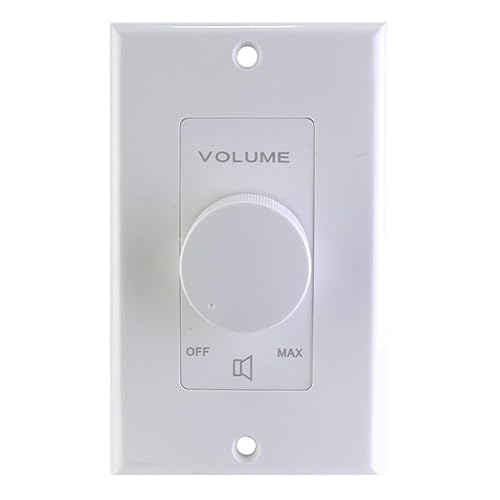
For soundbar enthusiasts seeking to enhance their audio experience, the 100W Impedance Matching Rotary Volume Control offers a unique solution with selectable impedance options. Choose from 1X, 2X, 4X, and 8X to ensure optimal performance with any sound system. With a power handling of 100 watts per channel and a frequency response of 20Hz to 20kHz, it provides superb audio fidelity. The 12-step attenuation feature allows for precise volume adjustments, and its installation is simple, fitting most junction boxes. Included accessories, such as a high-quality auto-former and various hardware options, make it a versatile addition for enhancing your soundbar setup.
Best For: Soundbar users and home theater enthusiasts looking for effective volume control and impedance matching for optimal audio performance.
Pros:
- Versatile impedance matching with selectable options (1X, 2X, 4X, 8X) for compatibility with various sound systems.
- High power handling of 100 watts per channel ensures powerful audio delivery.
- Easy installation with removable connecting strips, fitting most junction boxes with minimal depth requirements.
Cons:
- May require professional installation for optimal configuration, especially for those less experienced with audio setups.
- Limited aesthetic options with only three color choices (White, Ivory, Almond).
- The rotary volume control may not appeal to users who prefer digital controls over traditional knobs.
Factors to Consider When Choosing Optical to Analog Volume Control
When you’re choosing an optical to analog volume control for your soundbar, you need to consider several key factors. Focus on audio quality to ensure optimal sound performance, compatibility with your soundbar and other devices, and the power supply requirements. Additionally, evaluate the volume control options and the overall build quality to guarantee it meets your needs for an enhanced audio experience.
Audio Quality Assurance
Choosing the right soundbar can greatly enhance your audio experience, especially if you prioritize sound quality. To guarantee first-rate audio fidelity, look for soundbars that support high sampling rates like 192kHz/24-bit. This maintains clarity in sound reproduction. Advanced DAC chips are vital too; they help reduce noise and distortion during playback, giving you high-resolution audio output. Make certain the soundbar supports uncompressed audio formats such as LPCM or PCM, which are essential for quality transmission. Additionally, consider models with built-in volume control features for easy adjustment without sacrificing audio quality. Finally, opt for soundbars with durable housing materials to shield against electromagnetic interference, ensuring stable audio performance.
Compatibility With Devices
Understanding compatibility is essential to making the right choice for your soundbar’s optical to analog volume control. First, confirm it supports specific digital audio output formats, focusing on PCM/LPCM signals, as many soundbars may not output Dolby Digital or DTS. Next, check the supported sampling rates; higher fidelity options usually handle rates up to 192kHz/24-bit, guaranteeing ideal sound quality. Verify that the input and output connectors, like Toslink, RCA, or 3.5mm, match those on your audio source and playback devices to prevent compatibility issues. Also, consider whether the volume control offers an IR remote or manual adjustment, as this affects usability. Finally, review its power requirements to ensure it integrates smoothly with your existing soundbar setup without the need for extra adapters.
Power Supply Requirements
After verifying compatibility with your soundbar and other devices, it’s time to evaluate the power supply requirements for your optical to analog volume control. Most converters need a USB power supply, with a standard recommendation of 5V 1A for peak performance. Some models can draw power directly from the optical port, which simplifies setup and reduces cable clutter. However, you must ensure that the power supply matches the converter’s requirements; using the wrong voltage or amperage can cause malfunctions or damage. Many models include a power cable but not a power adapter, so you might need a spare charger or to purchase one separately. Always check power needs and connections, as inadequate power can lead to static noise or audio quality loss in your soundbar setup.
Volume Control Options
When selecting a soundbar with optical to analog volume control, you’ll want to contemplate the volume control options that best suit your needs. Some soundbars come with built-in knobs, allowing you to adjust sound output directly, while others depend on remote controls for convenience. If you prefer manual adjustments, look for soundbars with this feature. Additionally, built-in amplifiers in soundbars can enhance audio clarity, making them ideal for immersive sound experiences. Keep in mind that not all volume control options respond equally; some may have slow response times or revert to maximum volume upon powering up. Finally, verify that the soundbar is compatible with various audio formats, as some might not support surround sound formats like Dolby Digital or DTS.
Build Quality and Design
The build quality and design of soundbars play a significant role in their overall performance and longevity. Opting for soundbars with metal casings can offer better heat resistance and shielding against interference compared to plastic alternatives. A well-designed soundbar should feature user-friendly controls, either through a physical remote or an app, making adjustments a breeze and enhancing your listening experience. Look for high-quality connectors, like gold-plated HDMI and optical ports, which minimize signal loss and boost audio clarity. Compact designs are ideal for discreet installations, seamlessly fitting into your existing setup without taking up too much space. Additionally, some soundbars come with built-in subwoofers or amplifiers, improving sound quality, especially in systems that require enhanced bass or clarity.
Installation and Setup Ease
How easy is it to set up your soundbar with optical to analog volume control? Look for plug-and-play models that require no additional drivers or complex configurations. A clear instruction manual is essential, especially if you’re not very tech-savvy. Opt for compact designs that fit easily into tight spaces, helping you minimize clutter around your entertainment area. Be aware of whether the soundbar needs an external power source, like a USB supply, as this could complicate your setup if you don’t have one handy. Finally, evaluate the connectivity options; verify the soundbar includes the necessary cables or adapters to ensure compatibility with your existing audio equipment. Simplifying installation makes for a more enjoyable audio experience.







