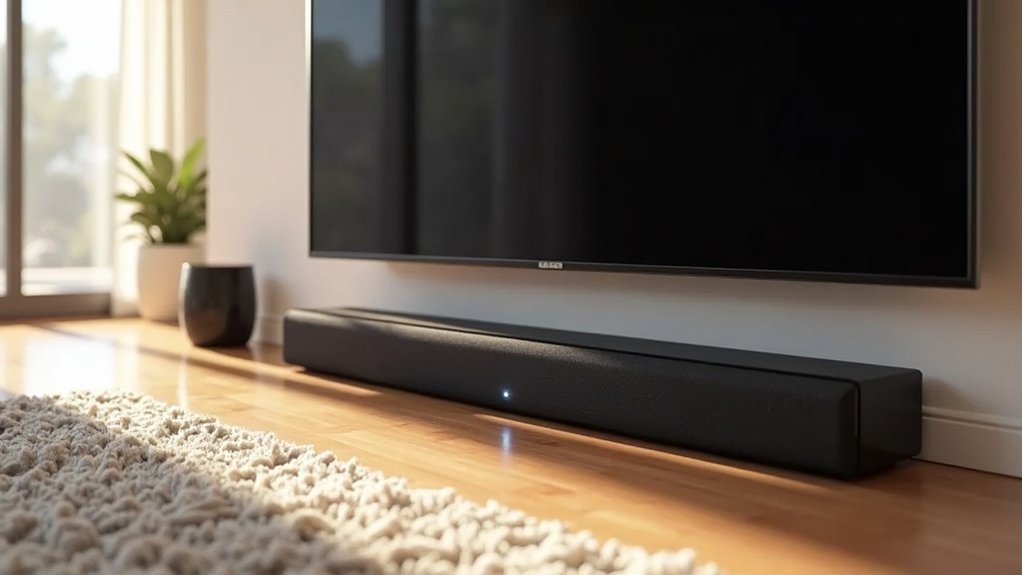
When placing a soundbar beneath a TV with wide legs, ensure it fits securely between the legs without obstruction. Position it 3-6 inches below the TV for optimal audio clarity, and make sure the front speakers are unobstructed for the best sound experience. If the soundbar is too wide, consider mounting it using brackets to enhance stability and alignment. Aim for aesthetic balance by centering the soundbar directly beneath the TV. For further insights on enhancing your soundbar setup efficiently, explore additional resources available on our website.
Key Takeaways
- Measure the distance between the TV legs to ensure the soundbar fits comfortably without obstruction.
- If the soundbar is too wide to fit between the TV legs, consider using a shelf or wall mount for optimal placement.
- For better audio projection and stability, position the soundbar slightly forward of the TV legs.
- Ensure that the soundbar is centered beneath the TV for a balanced and cohesive appearance.
- Select a soundbar color and material that complements your TV and surrounding decor, enhancing the overall aesthetic harmony in your space.
Understanding TV Leg Placement
When setting up your soundbar, understanding your TV’s leg placement is crucial.
TVs with wide legs often have feet positioned close to the edges, which can limit your options for soundbar placement. Measure the distance between the legs to ensure the soundbar fits comfortably in the center without obstructing the TV screen or remote sensor.
TVs with wide legs may restrict soundbar placement; measure the distance between the legs for optimal fitting and functionality.
If the soundbar is too wide for the available space, consider alternative mounting solutions such as a shelf or wall mount.
Additionally, make sure the soundbar aligns visually with the TV display for a harmonious setup.
It’s also important to confirm that the soundbar’s height doesn’t interfere with the remote control sensor, ensuring smooth functionality.
Optimal Soundbar Positioning
When positioning your soundbar, consider its height to ensure it aligns well with your TV screen for optimal viewing and listening experiences.
Stability is crucial, so make sure the soundbar rests on a solid surface or is securely mounted to prevent any movement during use.
Additionally, aim for aesthetic alignment by centering the soundbar beneath the TV to create a balanced appearance while enhancing audio performance.
Soundbar Height Considerations
To achieve ideal sound quality and clarity, it’s essential to take into account the height at which you position your soundbar.
- Position it 3-6 inches below the TV’s bottom to enhance audio clarity.
- Ensure that the soundbar’s front-facing speakers are unobstructed for optimal sound dispersion.
- If the soundbar is placed on a shelf, keep it centered and no more than 12 inches above the floor.
- Consider using the supplied feet to raise the soundbar if it interferes with the TV legs, thus maintaining sound quality.
Stability and Support
Ensuring your soundbar is stable and well-supported is essential for both sound quality and safety.
To achieve this, make sure your soundbar fits securely between the wide TV legs without obstructing them or the remote control sensor. Maintain stability by ensuring the soundbar’s width doesn’t exceed that of the TV legs, preventing any risk of tipping.
Position the soundbar slightly forward to enhance audio projection while keeping a balanced setup. If needed, use risers or foot attachments to elevate the soundbar, ensuring compatibility and ideal weight distribution for improved performance and stability in your audio experience.
Aesthetic Alignment
How can you achieve both visual appeal and ideal sound performance with your soundbar? Start by ensuring that the soundbar overlaps the TV’s bottom edge without obstructing the screen. Align it centrally for aesthetic balance, and consider these tips:
- Use a tempered glass pedestal stand for stability and a sleek look.
- Elevate the soundbar with the supplied feet to prevent interference with TV legs.
- Make sure the soundbar doesn’t block the remote control sensor to maintain functionality.
- Choose a design that complements your overall setup while enhancing sound projection.
This approach enhances your viewing experience while keeping your space stylish and cohesive.
Mounting Options for Soundbars
When considering mounting options for your soundbar, you can place it above the TV legs if the dimensions allow, but make sure it doesn’t obstruct the remote control sensor.
Alternatively, using a mounting bracket can provide a secure and visually appealing solution while optimizing audio performance.
Always ensure that your chosen method maintains sound quality by keeping the speakers front-facing to enhance your soundbar experience.
Placement Above TV Legs
To effectively place a soundbar above wide TV legs, it’s crucial to position it so that it overlaps the TV slightly without blocking the screen or the remote control sensor.
Here are some essential tips for optimal placement:
- Ensure the soundbar’s height is at ear level when seated for the best audio experience.
- Use adhesive like Blu Tack for added stability if the legs are wider than the soundbar.
- Confirm that the soundbar doesn’t obstruct your viewing angle.
- Securely fasten the soundbar to prevent tipping, making sure it’s compatible with your TV and soundbar specifications.
This setup not only enhances your audio experience but also maintains a sleek and tidy appearance.
Mounting Bracket Considerations
When choosing a mounting bracket for your soundbar, it’s crucial to consider the spacing between your TV legs and the soundbar’s design. Opt for brackets that securely fit, ideally within a width of 800 mm (31 1/2 in). Articulating mounts can enhance audio direction, while flat or tilt mounts are suitable for installations positioned below the TV. Always verify the weight capacity and compatibility of the mounting bracket to ensure safety and optimal performance for your soundbar.
| Mount Type | Benefits |
|---|---|
| Articulating | Allows flexible positioning for improved sound quality |
| Flat | Keeps the soundbar close to the TV for a streamlined look |
| Tilt | Minimizes glare while ensuring soundbar alignment with the TV |
Considerations for Aesthetic Balance
Achieving aesthetic balance in your home entertainment setup with a soundbar involves several key considerations.
When placing your soundbar, keep these points in mind:
- Ensure the soundbar is centered directly under the TV to maintain a cohesive look.
- Position the soundbar at a height that aligns with or slightly raises above the TV’s bottom edge for optimal audio projection.
- Surrounding decorative elements should be proportionate to enhance visual harmony.
- Choose a soundbar color and material that complements the TV legs and furniture, unifying the overall aesthetic.
Ensuring Audio Quality
A soundbar’s placement directly affects audio quality, so it’s crucial to consider several factors to enhance your listening experience.
Position your soundbar forward enough to avoid blocking the TV’s remote control sensor, typically at the bottom of the screen. Align the soundbar’s front-facing speakers with your ear level, generally 42 to 48 inches from the floor.
Avoid placing it within cabinets, as this muffles sound and hampers surround sound features like Dolby Atmos. If space is limited, use rigid foam to reduce resonances.
Finally, steer clear of reflective surfaces, such as glass, to prevent sound distortion and ensure optimal audio clarity.
Alternative Solutions for Installation
How can you enhance your soundbar installation for an optimal audio experience? Consider these alternative solutions to elevate your home theater setup:
- Choose a slim-profile soundbar that fits seamlessly in front of your TV.
- Mount the soundbar on the wall below the TV to ensure maximum audio projection.
- Invest in a sturdy pedestal stand that accommodates both your TV and soundbar in a visually appealing way.
- Adjust the soundbar’s height with risers or pads to ensure clear sound delivery and visibility.
These options help you navigate wide TV legs while maximizing your soundbar’s performance, ensuring a more immersive viewing experience.







